Winner • Google Nano Banana

MagicSpin 360°

An interactive AI-powered application that transforms a single 2D image (such as a product shot or character) into a smooth, draggable 360° rotation using Google Gemini.

2025
Top 25 / 2,723 Teams
Public Domain (CC0)

Overview

MagicSpin 360° is an AI-powered web application that bridges the gap between static imagery and interactive 3D-like experiences. It uses the generative multi-modal capabilities of Google Gemini 2.5 Flash to "imagine" and render the hidden sides of an object from a single 2D picture.

The core challenge was ensuring temporal consistency—making sure the subject's colors, features, and style remain completely stable as the virtual camera rotates around it. We solved this through an automated "Master Prompt" system that acts as an anchor for all generated frames.

Key Features

Multi-Modal Inputs

Start your spin by uploading an existing photo, generating an image via text prompt, or sketching a rough concept on a digital canvas.

Master Prompt Anchor

The AI automatically analyzes your base image and creates a strict "Master Prompt" to enforce visual consistency across all generated rotation angles.

Frame Interpolation

Optional frame interpolation logic doubles the number of generated angles, bridging the gaps to create a buttery-smooth rotation experience.

Interactive Viewer

A custom-built, touch-friendly 360° viewer component allows users to drag to rotate the subject manually or engage autoplay controls.

How It Works

Generating a 360-degree view from a single image requires carefully prompting the LLM to act as a virtual camera. Here is the step-by-step workflow:

  1. Acquisition: The user provides a base image (upload, sketch, or generate).
  2. Analysis: Gemini analyzes the base image to extract its core characteristics, locking in the "Master Prompt" to prevent hallucinations in subsequent frames.
  3. Generation: The system requests new frames at specific incremental angles (e.g., 45°, 90°, 135°) using the Master Prompt as the anchor.
  4. Interpolation: To ensure smooth transitions, the app can synthesize in-between frames.
  5. Playback: The array of frames is injected into the interactive UI viewer.
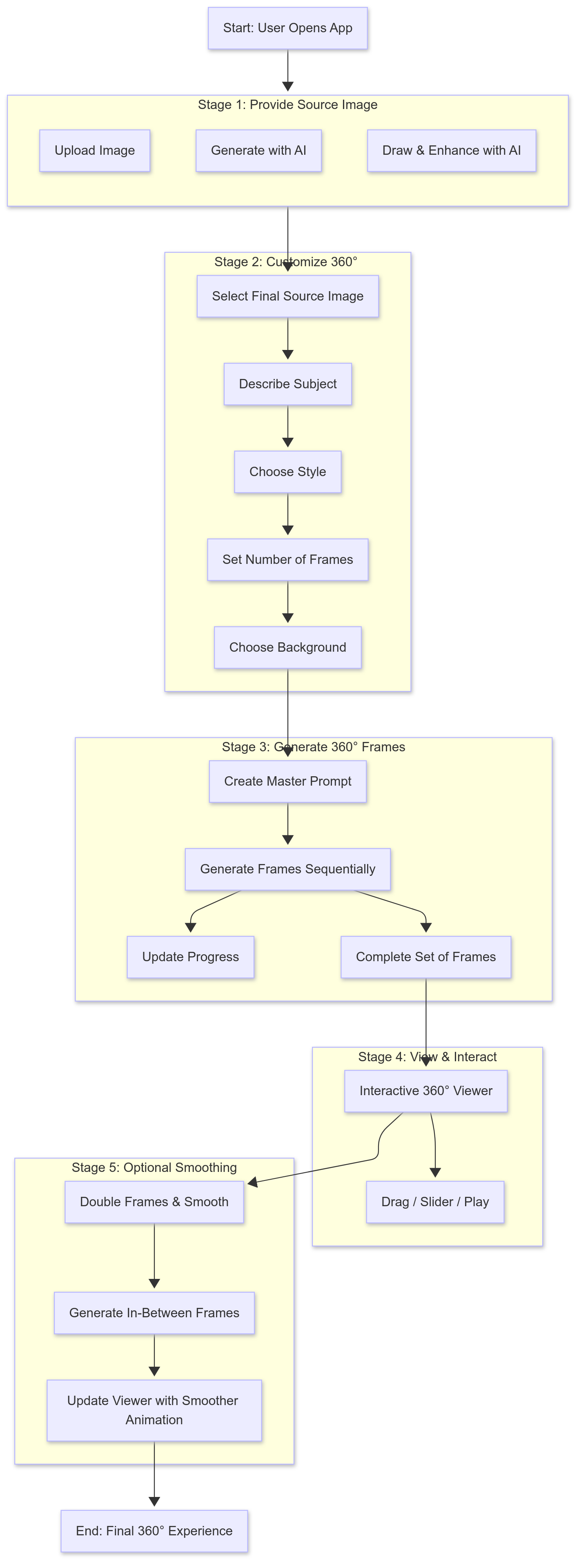
MagicSpin 360 Workflow Diagram

Technology Stack

AI & Vision

Google Gemini 2.5 Flash @google/genai SDK Generative Vision

Frontend

React 19 TypeScript Tailwind CSS Vite

Environment

Node.js GitHub Pages