Scaling to 1,500 Concurrent Users: PgBouncer and Null Pooling
How I discovered that application-level pooling doesn't work for long-running AI requests—and what actually does.
Scaling to 1,500 Concurrent Users: My Experience with PgBouncer and Null Pooling
How I discovered that application-level pooling doesn't work for long-running AI requests (and what actually does)
Introduction
I want to share what we learned scaling our backend to handle 10,000 total users with 1,500 concurrent long-running requests. This isn't a guide to 100K or beyond—we haven't been there yet. But the patterns that got us here are solid, and they go against what many standard guides recommend.
Our app does chat, RAG, agentic workflows—all the things an AI engineer wants to build. It was working great until we hit around 50 concurrent requests. Then everything started falling apart. We spent weeks digging into what was wrong. The problem turned out to be obvious in retrospect: we were creating new database connections for every request while requests were holding connections open for 20-40 seconds doing AI work. The database connection pool became our hard ceiling.
We tried the standard solution first—application-level pooling with SQLAlchemy and a pool size of 25. It didn't work. We kept exhausting it. We tried bigger pools. Same problem. Eventually, we deployed PgBouncer with statement-level pooling (null pooling), and that's when things clicked. We went from handling maybe 50 requests to 1,500 using fewer database connections than we'd started with.
This article is about what we learned along the way, why application pooling failed, and how statement-level pooling actually scales.
The Problem: Database Connection Overhead
The Hidden Cost of Creating Database Connections
When your backend code needs to do something with the database—read or write—it has to create a session. A session is just a conversation with the database. The session lifecycle manages the connection from start to finish.
Creating a database connection is expensive. Every new connection has to:
- Open a TCP socket to the database server
- Do an SSL/TLS handshake (if encryption is on)
- Authenticate
- Validate the connection
- Set up transaction context
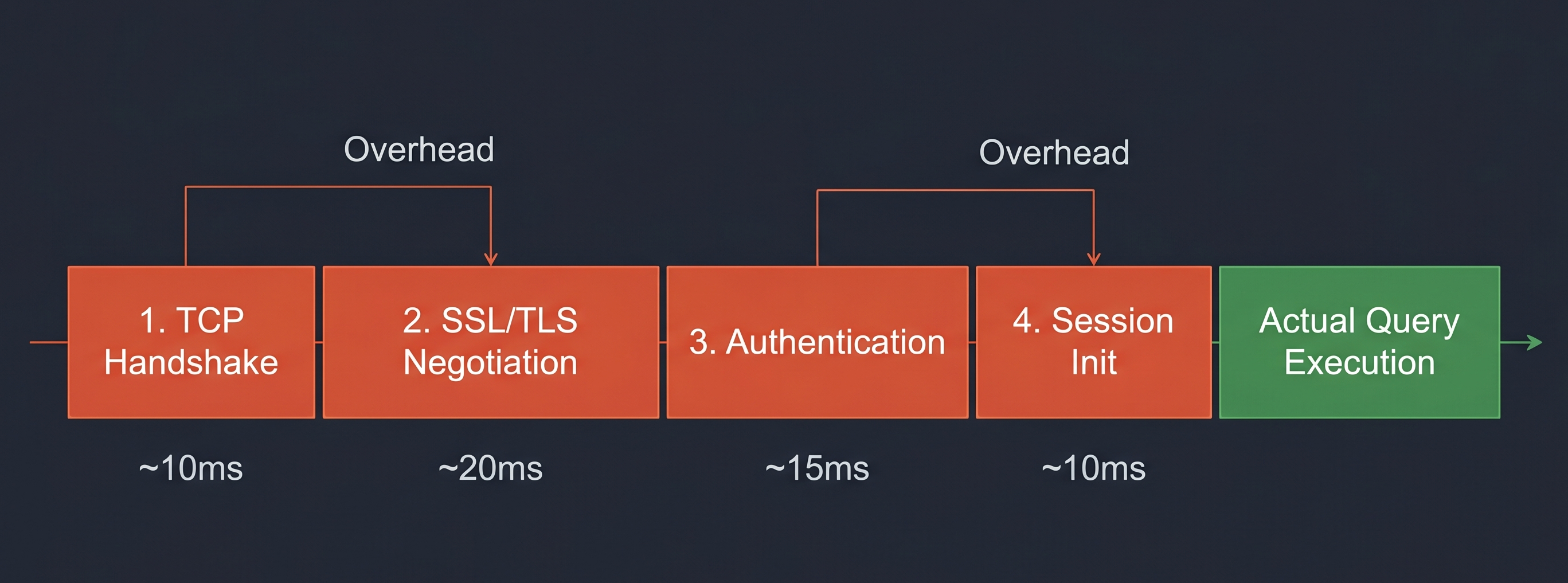
Each of those steps takes time—usually 10-50ms depending on network latency and how busy the database is. That doesn't sound like much. But when you have 50 requests at the same time, all trying to create connections: 50 × 50ms = 2,500ms of overhead. That's 2.5 seconds of CPU time just setting up connections that haven't done any actual work yet.
Every connection also takes memory—PostgreSQL uses about 10MB per connection by default. With hundreds or thousands of connections, you'll run out of memory before the database even gets overloaded.
Our Initial Architecture: One Session Per Endpoint
We used FastAPI's dependency injection. One session per request:
@app.post("/chat")
async def chat(user_input: str, session: Session = Depends(get_session)):
    response = llm.generate(user_input)
    session.add(ChatMessage(...))
    session.commit()
    return response
This pattern is fine for normal APIs. But our AI workflows were different. Here's what an agentic RAG request looked like:
- User submits query (session opens, connection acquired)
- Retrieve context from vectors (5-10 seconds, connection just sitting there)
- Call LLM to process query (10-30 seconds, connection still sitting there)
- Agent refines response (5 seconds, connection still waiting)
- Session closes
We were holding database connections open for 20-50 seconds for a single user request. When you have 50 concurrent users all doing this, all 50 connections are in use, all held idle. The pool fills up. New requests queue up waiting for a connection. It becomes a bottleneck immediately.
Understanding Connection Pooling
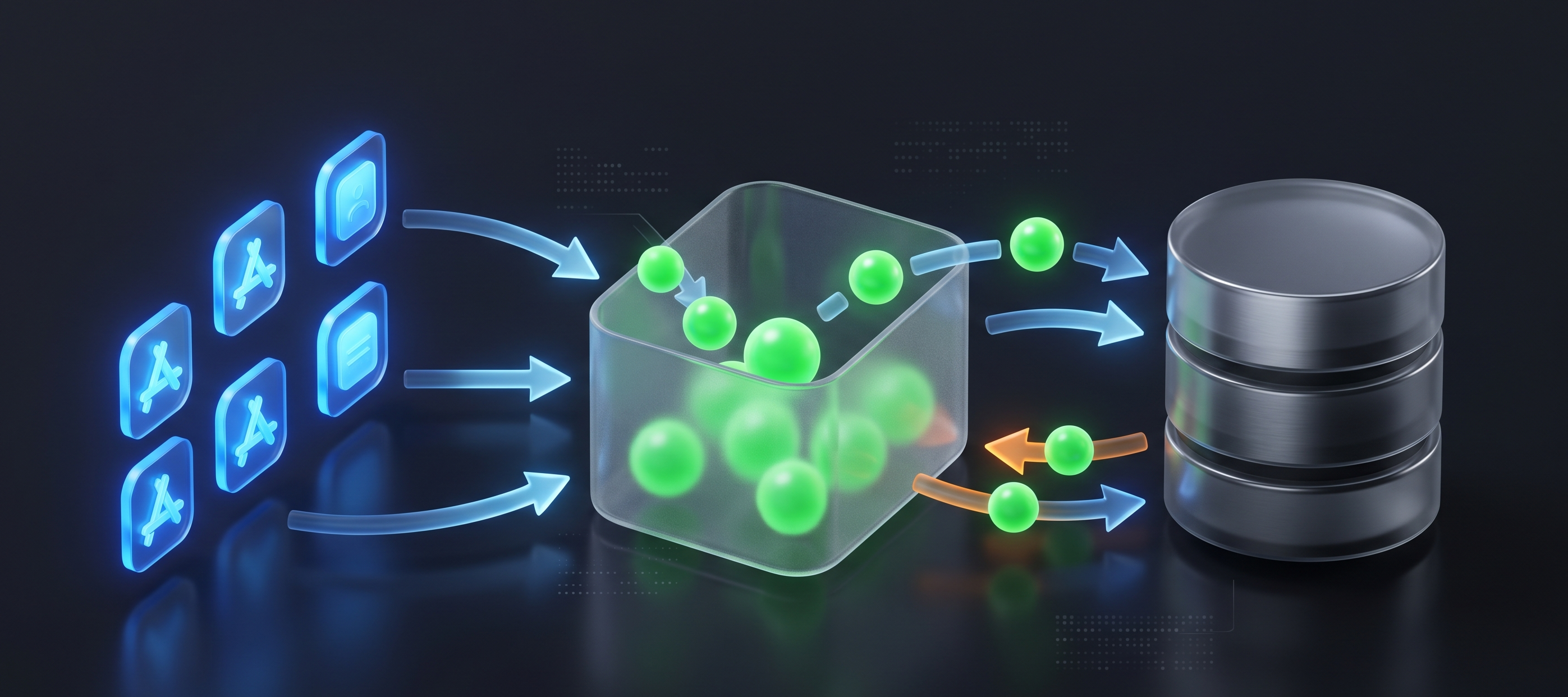
Connection pooling means: instead of creating a new connection every time you need one, you maintain a pool of open connections. Your code borrows one from the pool, uses it, returns it.
Approach 1: Local Application-Level Pooling
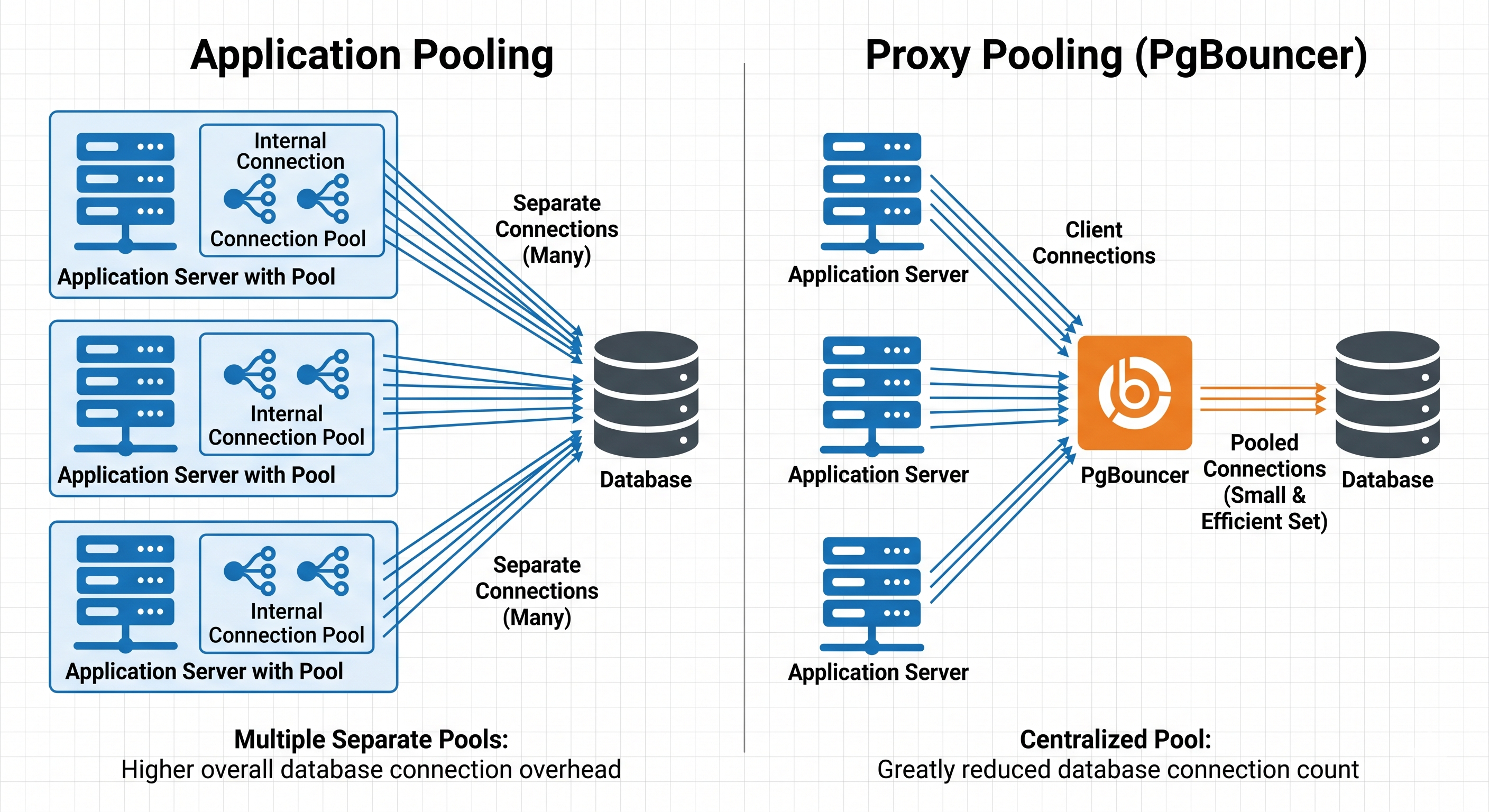
Application-level pooling maintains a fixed pool of database connections within your application process. Libraries like SQLAlchemy implement this pattern.
How It Works
- On startup, the application pre-establishes N connections (e.g., 20) and keeps them open.
- When your code needs a connection, it borrows one from the pool.
- After the operation completes, the connection is returned to the pool.
Example with SQLAlchemy:
engine = create_engine(
    "postgresql://user:password@localhost/db",
    poolclass=QueuePool,
    pool_size=20,              # Keep 20 connections open
    max_overflow=10,           # Allow up to 10 additional connections
    pool_pre_ping=True         # Test connections before using
)
Why Application Pooling Failed for Us
We configured SQLAlchemy with a pool of 25. The math looked OK in theory, but at 1,500 concurrent requests:
- 25 connections in the pool.
- 1,500 requests all trying to use them.
- Each request holding its connection for 20-40 seconds.
We were 60x over capacity. As long as we tied connection lifetime to request lifetime, we'd never have enough connections. We needed connections to be returned to the pool while the request was still running—between database operations, not at the end.
Approach 2: Proxy-Level Pooling with PgBouncer
Instead of pooling at the application level, you can use a database connection proxy like PgBouncer. It sits between your applications and PostgreSQL, managing all connections.
Key PgBouncer Modes
| Mode | Behavior | Best For |
|---|---|---|
| Session | Reuses connection for entire client session. | Web apps with login/logout. |
| Transaction | Reuses connection only for each transaction. | Traditional REST APIs. |
| Statement (Null Pooling) | Returns connection to pool after each statement. | Long-running AI workflows. ⭐ |
Why We Chose Statement Mode (Null Pooling)
Even in "transaction" mode, a connection is held for the duration of the transaction. If you call an LLM inside a transaction, the connection is still held idle. Statement mode solves this by releasing the connection immediately after the query finishes, even if the request is still active.
Important Trade-off: Statement mode breaks multi-statement transactions. If you do multiple SQL operations and expect them to rollback together, statement mode breaks that because each statement might use a different connection.
# ❌ This doesn't work reliably with statement mode
session.add(ProcessLog(...))
session.flush()  # Connection returned to pool

external_api_call()  # No connection held here

session.add(ProcessResult(...))
session.commit()  # Might use a DIFFERENT connection
Restructuring for Long-Running AI Operations
Implementing pooling is necessary, but you must also restructure how your code acquires connections. The one-session-per-endpoint pattern is the real bottleneck.
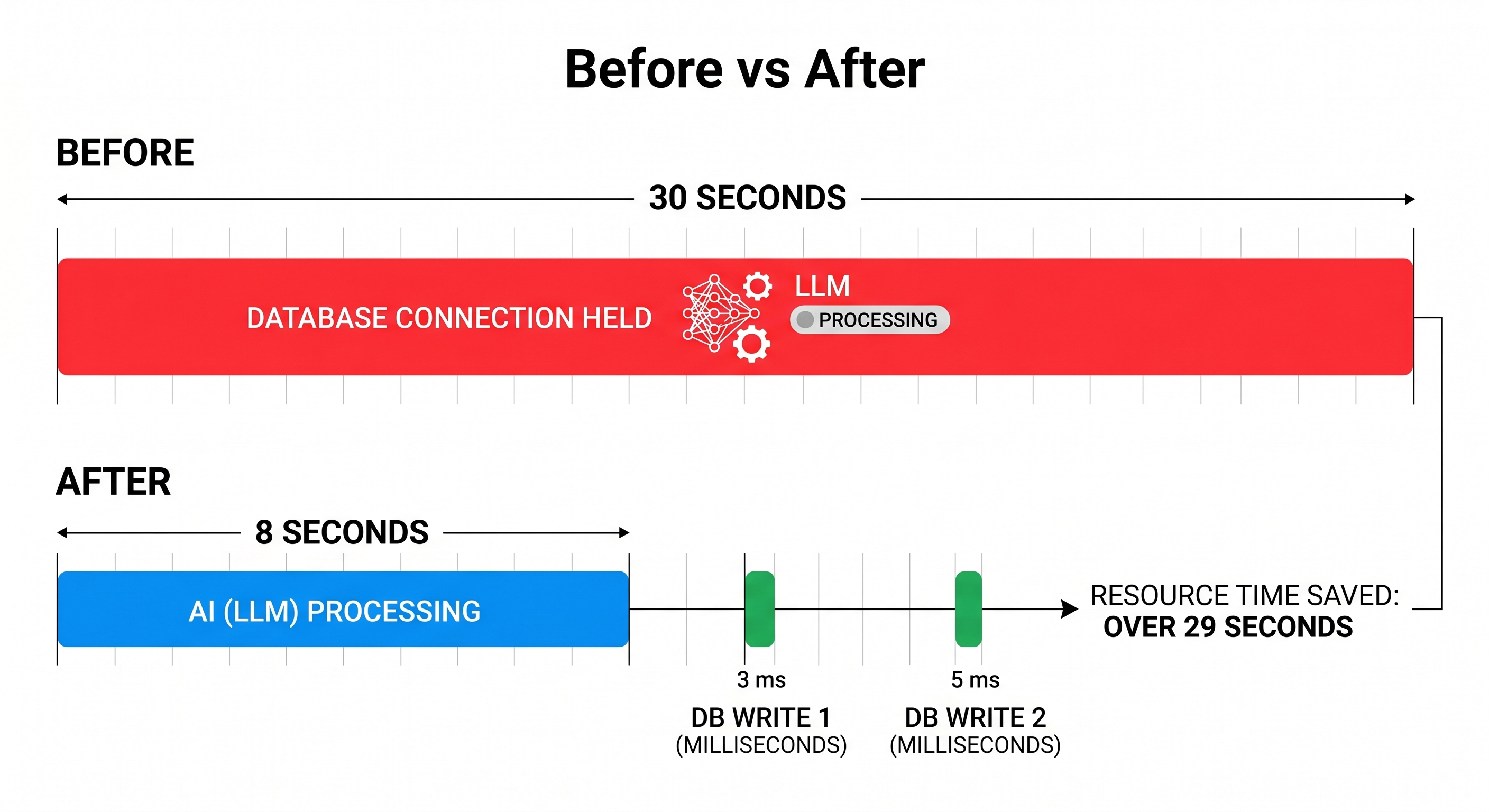
Solution: Acquire Connections Only When Needed
@app.post("/agentic-rag")
async def agentic_rag(query: str):
    # 1. AI operations with NO database access
    context = await retrieve_rag_context(query)   # 10s
    response = await llm.generate(query, context) # 20s

    # 2. Now we need the DB—get, use, and release it immediately
    session = Session()
    try:
        session.add(ChatLog(query=query, response=response))
        session.commit()
    finally:
        session.close()

    return {"response": response}
Practical Implementation: PgBouncer + Null Pooling
Step 1: Deploy PgBouncer
Install on a dedicated server or container:
docker run -d \
  -v /path/to/pgbouncer.ini:/etc/pgbouncer/pgbouncer.ini \
  -p 6432:6432 \
  pgbouncer:latest
Step 2: Configure for Statement Mode
Critical settings in pgbouncer.ini:
pool_mode = statement
max_client_conn = 2000
default_pool_size = 20
pool_pre_ping = true
Step 3: Remove Application-Level Pooling
Use NullPool in SQLAlchemy to let PgBouncer handle everything:
engine = create_engine(
    os.getenv("DATABASE_URL"), # Points to PgBouncer
    poolclass=NullPool
)
Monitoring and Debugging
Monitoring PgBouncer
Connect to the admin console:
psql -h pgbouncer.internal -p 6432 -U pgbouncer -d pgbouncer
# Useful commands:
show pools;   # See pool status
show clients; # Connected clients
show stats;   # Performance statistics
Common Issues
| Issue | Symptoms | Solution |
|---|---|---|
| Pool Exhaustion | "no more connections available" | Increase max_client_conn, audit session scope. |
| Stale Connections | "connection lost" errors | Enable pool_pre_ping=True. |
| Connection Leaks | Pool slowly fills up | Ensure try/finally with session.close(). |
Expected Performance Improvements
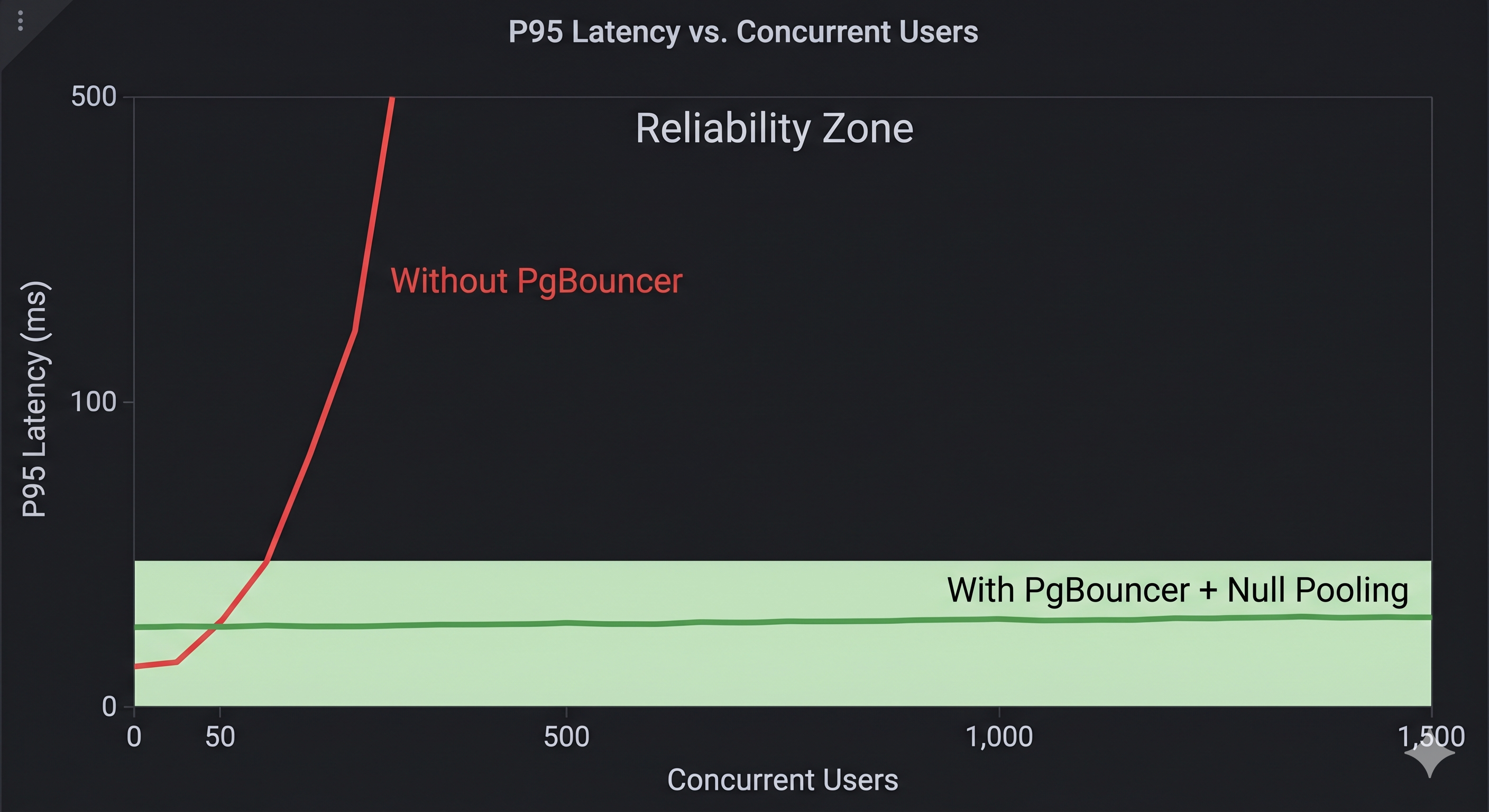
Scaling from 50 to 1,500 concurrent requests:
| Metric | Before | After | Improvement |
|---|---|---|---|
| Max Concurrency | ~50 | ~1,500 | 30x |
| RAM Usage (DB) | 3.5GB | 400MB | ~9x reduction |
| P95 Latency @ 50 | 450ms | 95ms | 4.7x faster |
| DB Connections | 250+ | 20-25 | 10x fewer |
Conclusion
We went from 50 concurrent requests to 1,500 by realizing that application-level pooling is fundamentally incompatible with long-running AI requests. By moving pooling to PgBouncer and adopting statement-level pooling, we served more users with fewer resources.
If you're hitting database bottlenecks in your AI app, stop tuning your app-level pool. Deploy PgBouncer, switch to statement mode, and keep your transactions tight. The jump in scale is worth the effort.
About the author
Abu Bakar Siddik
Lead AI Engineer. He builds production LLM systems, including agent orchestration, tool integration, and private deployments for regulated environments, and researches agent security and alignment.
Follow along
New essays go up here first. Follow via RSS.
Related